
How to Cancel Your AI Amplifier Club Membership or Get Support from Mastermind
Purpose
This article explains how clients can get support for the AI Amplifier Club membership, including billing, access, and cancellations. Because this membership is managed directly by Dean Graziosi's Mastermind team, this article provides clear direction so clients can reach the right team quickly and take action with confidence.
Who Manages the AI Amplifier Club
While Tony Robbins and Dean Graziosi collaborate on several events and projects throughout the year, including the AI Advantage Summit, the AI Amplifier Club membership is managed directly by Dean Graziosi's team at Mastermind.
RRI does not have the ability to make changes to billing, access, or cancellations for this membership. The Mastermind support team is fully equipped to help and is ready to assist quickly and effectively.
How to Contact the Mastermind Support Team 🌟
You can reach their team through any of the following options:
- Help Center: Log in to your Mastermind.com account and locate the Help Center tab under the Support section on the left side of your screen.
- Live Chat: Available Monday through Friday, 6 AM to 6 PM PST, directly within your Mastermind account.
- Email Support (General): For general inquiries, contact support@mastermind.com.
- Business Hub Live Chat: Available 24 hours a day, 7 days a week for technical support. Log in to your account, click the Business Hub tab, and look for the live chat icon in the bottom right corner to connect with their Hub Experts.
- Email Support (AI Advantage Specific): For AI Advantage specific support, contact support@aiadvantage.com.
How to Cancel Your AI Amplifier Club Membership
Follow these steps to cancel your membership directly through the AI Advantage platform.
Step 1: Log Into Your Account
- Visit app.aiadvantage.com and sign in using the email address and password associated with your membership.
If You Are Having Trouble Logging In
- Search your inbox for a welcome email titled "Welcome to the AI Amplifier Club" sent from aiadvantage@mastermind.com.
- This email includes a "Set My Club Password Now" button to help you get access.
- Be sure to check your Spam, Junk, Promotions, or All Mail folders if you do not see it in your primary inbox.
If You Forgot Your Password
- Go to app.aiadvantage.com and click Forgot Password.
- Enter your email address and follow the reset instructions sent to your inbox.
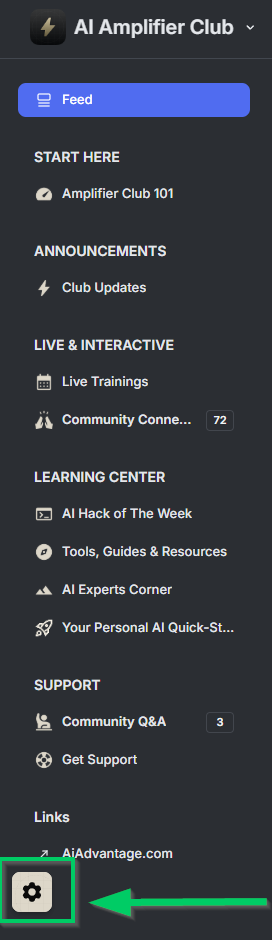
Step 1: Access Your Account Settings ⚙️
- Once logged in, click the gear icon located in the bottom left corner of your screen.
- If the gear icon is not visible, set your browser zoom to 100% or lower and it will appear.
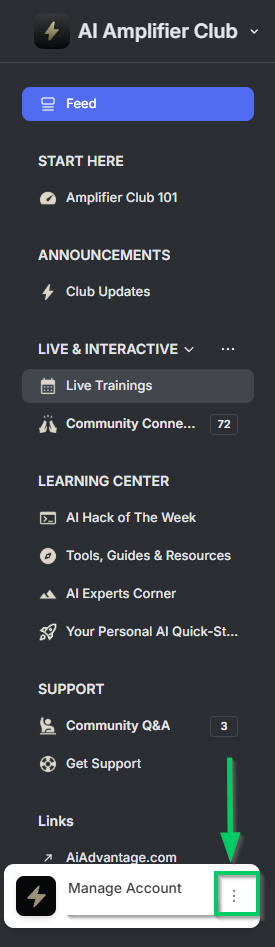
Step 2: Open Account Options
- Click the three dots (⋮) located next to Manage Account.
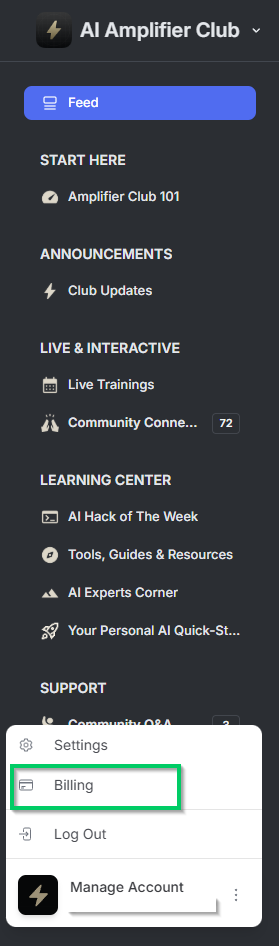
Step 3: Go to Billing
- Select Billing from the dropdown menu.
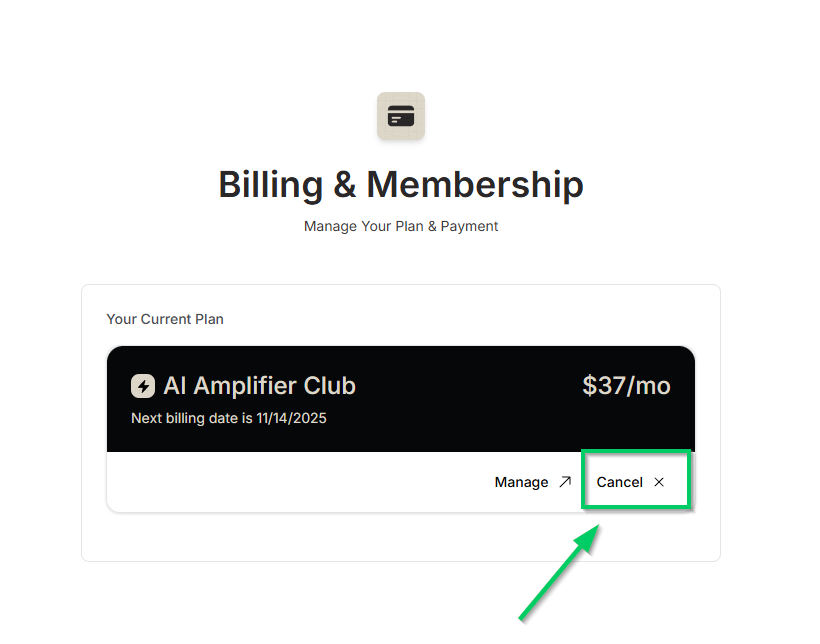
Step 4: Cancel Your Subscription
- On the Billing page, click Cancel.
- Provide any requested feedback.
- Confirm by selecting "Cancel My Subscription."
Your membership will remain active until the end of your current billing period.
What to Expect After Canceling
- Your access continues through the end of your current billing cycle.
- You will not be charged again after cancellation is confirmed.
- For any general Mastermind questions, contact support@mastermind.com.
- For any follow up questions specific to AI Advantage, contact support@aiadvantage.com.
We are grateful you are part of the broader Tony and Dean community. While RRI is not able to manage this specific membership, the steps above are designed to make this process as smooth and straightforward as possible. You have everything you need to move forward with clarity and confidence. 💪
Comments
0 comments
Article is closed for comments.